USB-triggered emergency shutdowns
TLDR: You can trigger emergency shutdowns by detecting USB changes
In this guide you will learn how to trigger a shutdown by yanking off a USB. This is an anti-forensic tool.
Note: This will not help you if you don't have additional protections like FDE (Full Disk Encryption) and deniability. Therefore, we will assume you have a setup from the live mode guide.
Should you use this?
- To prevent LE from capturing your device while it's unencrypted.
- If you're a high value target.
- As a dead-man's switch. (CLEARNET)
Setup (to run in sysmaint mode if user/sysmaint split is still present)
-
Make sure you have
lsusbinstalled. Usually the package name would beusbutils.Once you see a list of USB devices, you're good to proceed to the next step.user ~$ sudo apt install usbutils user ~$ lsusb Bus 0xx Device 0xx: ID xxxx:xxxx Logitech Wired Mouse Bus 0xx Device 0xx: ID xxxx:xxxx HP, Inc USB Flash Drive . . . -
Make sure you have
reboot.shin the /usr/local/bin directory and give it executable permissions.
Note that this script will be executed as root.
user ~$ sudoedit /usr/local/bin/reboot.sh
user ~$ sudo chmod 744 /usr/local/bin/reboot.sh
Example file:
user ~$ cat /usr/local/bin/reboot.sh
#!/bin/bash

/usr/sbin/reboot now
- Copy the following bash script to your home directory and give it executable permissions.
user ~$ vim setup.sh
user ~$ chmod +x setup.sh
#!/usr/bin/env bash

set -euo pipefail

command -v lsusb >/dev/null || { echo "lsusb not found (install usbutils)" >&2; exit 1; }

declare -A sysdir=()
for d in /sys/bus/usb/devices/*/; do
    uev=${d}uevent
    [[ -f $uev ]] || continue
    grep -qx 'DEVTYPE=usb_device' "$uev" || continue
    bus=$(sed -n 's/^BUSNUM=//p'  "$uev")
    num=$(sed -n 's/^DEVNUM=//p'  "$uev")
    [[ -n $bus && -n $num ]] || continue
    sysdir[$((10#$bus))/$((10#$num))]=${d%/}
done

mapfile -t devices < <(lsusb)
(( ${#devices[@]} )) || { echo "lsusb reports no USB devices" >&2; exit 1; }

PS3="Choose a USB device [1-${#devices[@]}]: "
select sel in "${devices[@]}"; do
    if [[ -z $sel ]]; then
        echo "Pick a number from the list." >&2
        continue
    fi

    [[ $sel =~ Bus[[:space:]]+0*([0-9]+)[[:space:]]+Device[[:space:]]+0*([0-9]+): ]] || {
        echo "Could not parse: $sel" >&2; continue; }

    dir=${sysdir[$((10#${BASH_REMATCH[1]}))/$((10#${BASH_REMATCH[2]}))]:-}
    [[ -d $dir ]] || { echo "No sysfs entry for $sel" >&2; continue; }

    device_id=$(sed -n 's/^PRODUCT=//p' "$dir/uevent" | head -1)
    echo "ACTION==\"remove\", SUBSYSTEM==\"usb\", ENV{PRODUCT}==\"$device_id\", RUN+=\"/usr/local/bin/reboot.sh\""
    exit 0
done

echo "No device selected." >&2
exit 1
- Run the above script, selecting the triggering device
user ~$ ./setup.sh
1) Bus 0xx Device 0xx: ID xxxx:xxxx Logitech Wired Mouse
2) Bus 0xx Device 0xx: ID xxxx:xxxx HP, Inc USB Flash Drive
...
Choose a USB device [1-4]: 2
ACTION=="remove", SUBSYSTEM=="usb", ENV{PRODUCT}=="xxxx/xxxx/xxxx", RUN+="/usr/local/bin/reboot.sh"
- Copy the last line output by the script, then edit the
/etc/udev/rules.d/99-z-killusb.rulesfile, pasting the line in.
user ~$ sudoedit /etc/udev/rules.d/99-z-killusb.rules
user ~$ cat /etc/udev/rules.d/99-z-killusb.rules
ACTION=="remove", SUBSYSTEM=="usb", ENV{PRODUCT}=="xxxx/xxxx/xxxx", RUN+="/usr/local/bin/reboot.sh"
user ~$ sudo udevadm control -R
What the setup does
It asks the kernel to run the script located at /usr/local/bin/reboot.sh as root every time the selected USB device is removed.
Note that it matches any device that has the same vendor and product ID, so if you have multiple USB devices of the same model, removing any of them will trigger the script.
Usage
-
After setup, reboot the device. Upon boot, the trigger is automatically ready and arms upon the selected device(s) insertion, no matter if you boot in sysmaint or user mode.
-
Now it's ready to go. You can now test if your script is working as intended. Removing the drive will reboot the system.
Additional setup
You can run the setup script multiple times and select multiple different devices, and adding multiple lines in the udev rules file. This will also trigger the script upon removal of any of the devices.
You should consider tying a cord from the USB device to your body if you're a target. Hooking it up to your belt would be a good option. In case your house gets broken into, and you don't really have time to do anything, you could move and the USB would disconnect, running the trigger command and erasing all evidence.
- This is exactly what BusKill (CLEARNET) does, but without the special cord, attachments, and program.
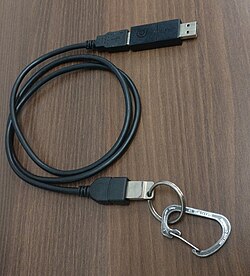
The above image is the first prototype of BusKill. Similar to that, you can use a hook to attach it to yourself.
Final notes
I hope the guide helped. Cheers!
DISCLAIMER: This blog's stance is not to endorse sensitive activities and nothing in this article serves as legal advice. You are responsible for whatever you do, unless found not guilty.
 Suggest changes
 Jake Samre
 2026-10-01
 Donate XMR to the author:
83omoTev9gKeN6qT9vY3fB7x315ZpRw3gMLqQB8Xck2e1cc3VY6mNPJ6cNGZvghggAAXABMn5w2J4NDdHYXmofW1RkdKbna